

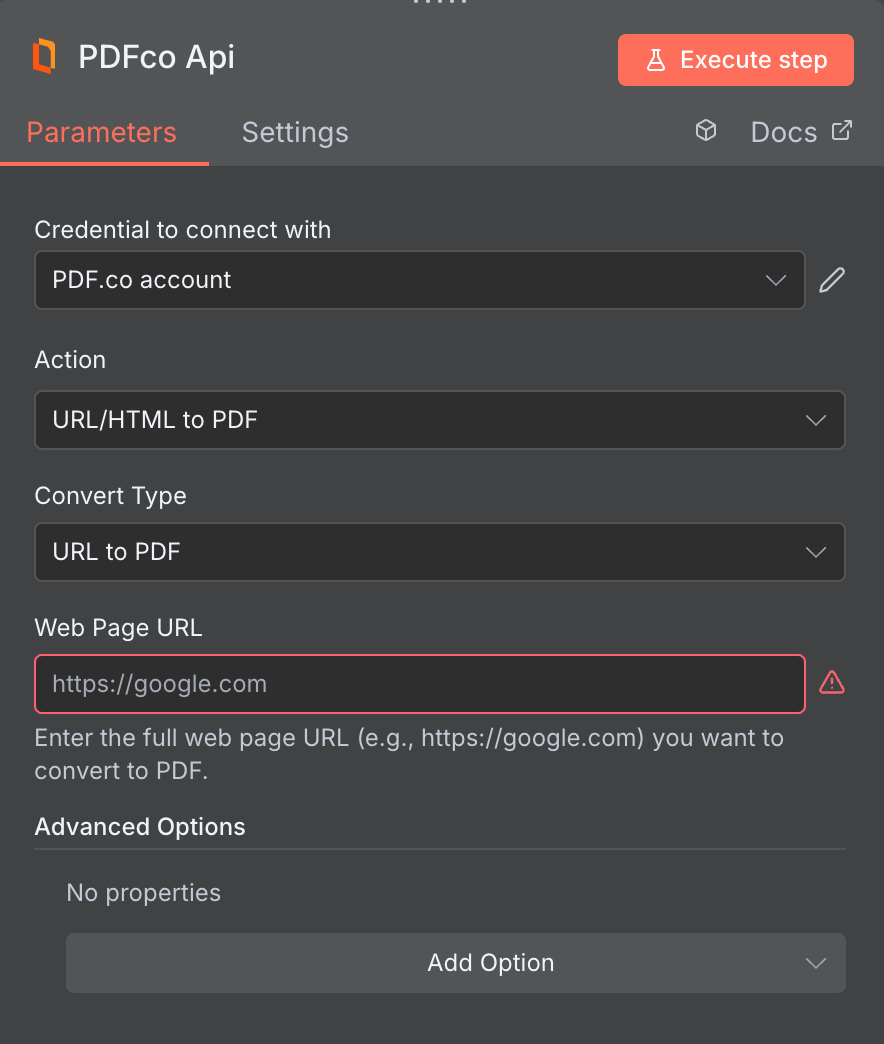
Input
The n8n node doesn’t expose every PDF.co API parameter as a field. To pass a parameter that isn’t shown, put it under This works for any standard parameter listed in the API Reference. See Standard Parameters for details.
std_params in the Custom Profiles field (see Custom Profiles below). For example, to add a repeating header and footer to every page:{ "std_params": { "header": "<div>My Header</div>", "footer": "<div>My Footer</div>" } }
| Name | Description | Required |
|---|---|---|
| Convert Type | Choose the type of conversion you want to perform: URL to PDF, HTML to PDF, or HTML Template to PDF. If you’ve previously created an HTML template in PDF.co, you can select the template (by copying the Template ID) to inject it with dynamic JSON data and generate a PDF automatically. | Yes |
| Source File URL | Provide the URL to the source PDF document, or a filetoken:// link from PDF.co Built-In Files Storage. If you use another cloud service such as Google Drive or Dropbox ensure the link is publicly accessible. | Yes |
| HTML Code | Enter the HTML code you want to convert into a PDF file. | No, unless you’re using HTML to PDF |
| Template ID | Set ID of HTML template to be used. View and manage your templates at HTML to PDF Templates. See guidance below to learn more about HTML Template to PDF conversion. | No, unless you’re using HTML Template to PDF |
| File Name | File name for the generated output, the input must be in string format. | No |
| Orientation | Sets the document orientation. Options: Portrait for vertical layout, and Landscape for horizontal layout. | No |
| Paper Size | Specifies the paper size. Supports standard formats such as Letter, Legal, Tabloid, Ledger, and A0 to A6. If you need a custom size, use the Custom Paper Size option instead. Do not use both Paper Size and Custom Paper Size at the same time. | No |
| Custom Paper Size | Set a custom size by providing width and height separated by a space, with optional units: px (pixels), mm (millimeters), cm (centimeters), or in (inches). Examples: ‘200 300’, ‘200px 300px’, ‘200mm 300mm’, ‘20cm 30cm’, ‘6in 8in’. | No |
| Render Page Background | Set to false to disable background colors and images are included when generating PDFs from HTML/URL | No |
| Do Not Wait for Full Load | Controls how thoroughly the converter waits for a page to load before converting HTML to PDF --- false waits for full page load, while true speeds up conversion by waiting only for minimal loading. | No |
| Margins | Set custom margins, overriding CSS default margins. Specify the margins in the format {top} {right} {bottom} {left}. You can usepx,mm,cmorinunits. Also, you can set margins for all sides at once using a single value. | No |
| Media Type | Controls how content is rendered when converting to PDF. Options: print (uses print styles), screen (uses screen styles), none (no media type applied). | No |
| Header | Add HTML code for the page header. This content will appear at the top of every page in the generated PDF. | No |
| Footer | Add HTML code for the page footer. This content will appear at the top of every page in the generated PDF. | No |
| Webhook URL | The callback URL or Webhook used to receive the output data. | No |
| Output Link Expiration (In Minutes) | Set the expiration time for the output link in minutes. After this specified duration, any generated output file(s) will be automatically deleted from PDF.co Temporary Files Storage. The maximum duration for link expiration varies based on your current subscription plan. To store permanent input files (e.g. re-usable images, pdf templates, documents) consider using PDF.co Built-In Files Storage. | No |
| Custom Profiles | Use JSON to customize PDF processing with options like output resolution, OCR settings, text extraction methods, encryption, and image handling. Check our Custom Profiles section to see all available parameters for your current endpoint. | No |
HTML Template to PDF
HTML Template to PDF conversion allows you to transform predefined HTML templates into PDF documents with injected data. Each HTML template has a unique ID, you simply need to enter this ID in your n8n module and provide the required data in JSON format. You can create your own templates or use the predefined ones available in the PDF.co HTML Templates Tool. You can use data in JSON or CSV format to inject into your HTML template. See the sample below:JSON Sample
{'paid': true, 'invoice_id': '0002', 'total': '$999.99'}
CSV Sample
`invoice_id, total\\r\\n12345,$999`
Custom Profiles
You can set additional options for the operation used in the PDF.co node by using Custom Profiles. A custom profile is a string in JSON-like format containing predefined parameters. Here’s an example of a Custom Profiles input:{ "outputDataFormat": "base64" }
base64 format. You can find the list of available parameters for customizing profiles in the PDF.co operation documentation below:
You can use any regular API parameter from the API Reference within n8n using the
std_params feature in profiles. The std_params enables the definition of regular API parameters in a JSON format, See Standard Parameters for detailed documentation and examples.| Parameter | Type | Default | Description |
|---|---|---|---|
outputDataFormat | string | - | If you require your output as base64 format, set this to base64 |
HTMLCodeHeadInject | string | - | Injects custom CSS and JavaScript code into the HTML <head> section during conversion. See HTML to PDF Knowledge Base for more information and sample usage. |
DataEncryptionAlgorithm | string | - | Controls the encryption algorithm used for data encryption. See User-Controlled Encryption for more information. The available algorithms are: AES128, AES192, AES256. |
DataEncryptionKey | string | - | Controls the encryption key used for data encryption. See User-Controlled Encryption for more information. |
DataEncryptionIV | string | - | Controls the encryption IV used for data encryption. See User-Controlled Encryption for more information. |
DataDecryptionAlgorithm | string | - | Controls the decryption algorithm used for data decryption. See User-Controlled Encryption for more information. The available algorithms are: AES128, AES192, AES256. |
DataDecryptionKey | string | - | Controls the decryption key used for data decryption. See User-Controlled Encryption for more information. |
DataDecryptionIV | string | - | Controls the decryption IV used for data decryption. See User-Controlled Encryption for more information. |
Output
| Name | Description |
|---|---|
jobId | Unique identifier for the background job. |
pageCount | Number of pages in the PDF document. |
error | Indicates whether an error occurred (false means success) |
status | Status code of the request (200, 404, 500, etc.). For more information, see Response Codes. |
credits | Number of credits consumed by the request |
remainingCredits | Number of credits remaining in the account |
duration | Time taken for the operation in milliseconds |
url | Direct URL to the final PDF file stored in S3. |
name | Name of the output file |
outputLinkValidTill | Timestamp indicating when the output link will expire |