

Modifying Restriction Settings: To modify assembly or extraction settings that control PDF restrictions (such as
allowPrintDocument, allowFillForms, allowModifyDocument, allowAssemblyDocument, and related permission settings), you must use the ownerPassword in your request. The userPassword alone cannot modify these permission settings. Attempting to change these restrictions with only a userPassword will result in an error: "This file is password-protected. Please ensure you've entered the correct password…". This requirement applies only when making changes to those restrictions.Input
The Make module doesn’t expose every PDF.co API parameter as a field. To pass a parameter that isn’t shown, use the Profiles field with
std_params. Enable Advanced Settings to see it (see Profiles). See Standard Parameters for details.| Name | Description | Required |
|---|---|---|
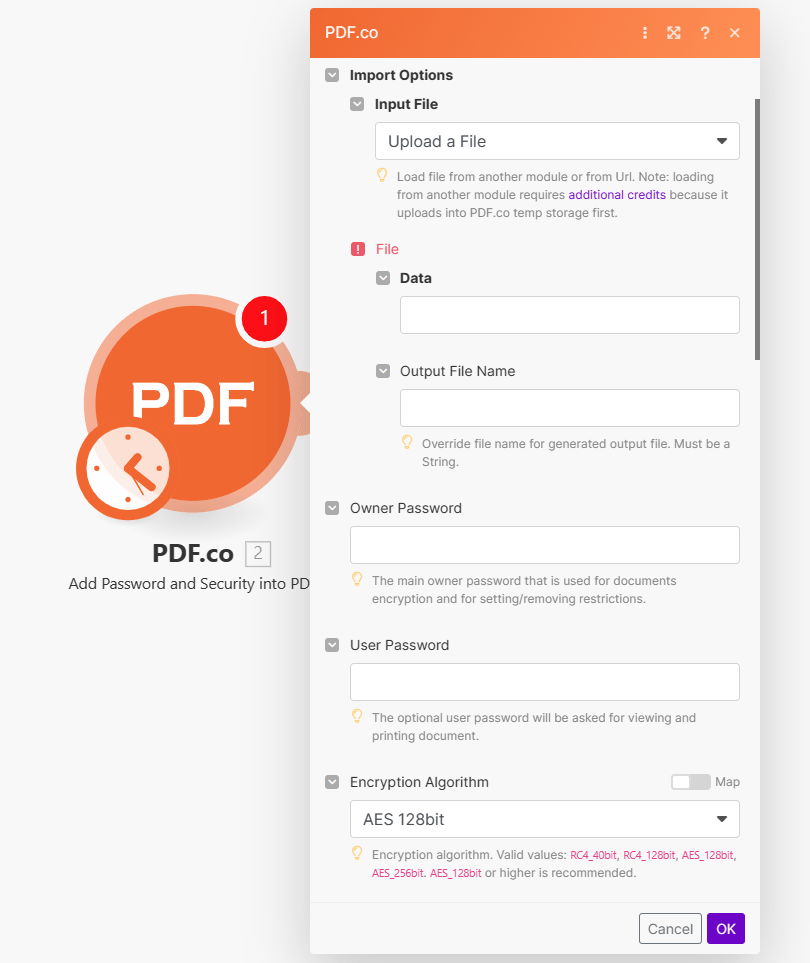
| Import Options | Choose the input source, either Upload a File or Import PDF from URL. | Yes |
Upload a File
| Name | Description | Required |
|---|---|---|
| Data | Upload a file using raw binary data from another module. Note: This requires additional credits as it first uploads to PDF.co Temporary Files Storage. | Yes |
| Output File Name | Specify a custom file name for the output file. | No |
| Name | Description | Required |
|---|---|---|
| URL | Provide the URL to the source PDF document, or a filetoken:// link from PDF.co Built-In Files Storage. If you use another cloud service such as Google Drive or Dropbox ensure the link is publicly accessible. | Yes |
| Output File Name | Specify a custom file name for the output file. | No |
| Name | Description | Required |
|---|---|---|
| Owner Password | Set the main owner password for document encryption and managing restrictions. | No |
| User Password | Optional user password for viewing and printing the document. | No |
| Encryption Algorithm | Choose the encryption algorithm. Options: RC4_40bit, RC4_128bit, AES_128bit, AES_256bit. Recommended: AES_128bit or higher. | No |
| Print Document | Choose to allow or prohibit printing the PDF document. | No |
| Print Quality | Define allowed printing quality. | No |
| Assembly Document | Allow or prohibit assembling the document. | No |
| Content Extraction | Allow or prohibit copying content from the PDF document. | No |
| Accessibility Support | Allow or prohibit accessibility features in the PDF document. | No |
| Modify Document | Allow or prohibit modification of the PDF document. | No |
| Fill Forms | Allow or prohibit filling of interactive form fields (including signature fields) in the PDF document. | No |
| Modify Annotations | Allow or prohibit interacting with text annotations and forms in the PDF document. | No |
| Execution Mode | Select Sync for small tasks up to 10 seconds. Choose Async for standard jobs, or Async For Large Docs for tasks over 30 seconds. Use Job Check module for retrieving results in large tasks. | No |
| Profiles | Add custom options for the process in a JSON string format. See API Profiles for more details. | No |
| Output Links Expiration | Set the expiration time in minutes for output links. Default is 60 minutes. Increase this limit with a Business Plan or higher, see plans here for details. | No |
| Export Type | Choose between Download a File or JSON Output. Default is Download a File. | No |
Integrating External File Sources
Streamline your Make workflows with external file sources like Google Drive and Dropbox using their unique actions. Discover efficient integration strategies in our guide: File Source Integrations in Make.
Output
| Name | Description |
|---|---|
url | This is the temporary URL provided by the PDF.co file server. |
Data | Represents the output binary data. This data is generated only when the Export Type option is set to Download a File. |
Status | Indicates the response status code. A success status is returned if the operation is successful. |
Page Count | The total number of pages in the output PDF. |
outputLinkValidTill | Specifies the timestamp until which the url remains accessible. |
error | Provides details about any errors encountered during the process, if applicable. |
name | The designated name of the output file. |
Job Id | A unique identifier assigned to the job. |
credits | The amount of credits utilized for the process. |
Remaining Credits | Displays the balance of credits available in your account. |
duration | The duration of time the process took to complete. |
Profiles
To display the Profiles fields, you must enable Advanced Settings by clicking the toggle:
Here’s an example of a Custom Profiles input:
{ "outputDataFormat": "base64" }
You can use any regular API parameter from the API Reference within Make using the
std_params feature in profiles. The std_params enables the definition of regular API parameters in a JSON format, See Standard Parameters for detailed documentation and examples.| Parameter | Type | Default | Description |
|---|---|---|---|
outputDataFormat | string | - | If you require your output as base64 format, set this to base64 |
DataEncryptionAlgorithm | string | - | Controls the encryption algorithm used for data encryption. See User-Controlled Encryption for more information. The available algorithms are: AES128, AES192, AES256. |
DataEncryptionKey | string | - | Controls the encryption key used for data encryption. See User-Controlled Encryption for more information. |
DataEncryptionIV | string | - | Controls the encryption IV used for data encryption. See User-Controlled Encryption for more information. |
DataDecryptionAlgorithm | string | - | Controls the decryption algorithm used for data decryption. See User-Controlled Encryption for more information. The available algorithms are: AES128, AES192, AES256. |
DataDecryptionKey | string | - | Controls the decryption key used for data decryption. See User-Controlled Encryption for more information. |
DataDecryptionIV | string | - | Controls the decryption IV used for data decryption. See User-Controlled Encryption for more information. |