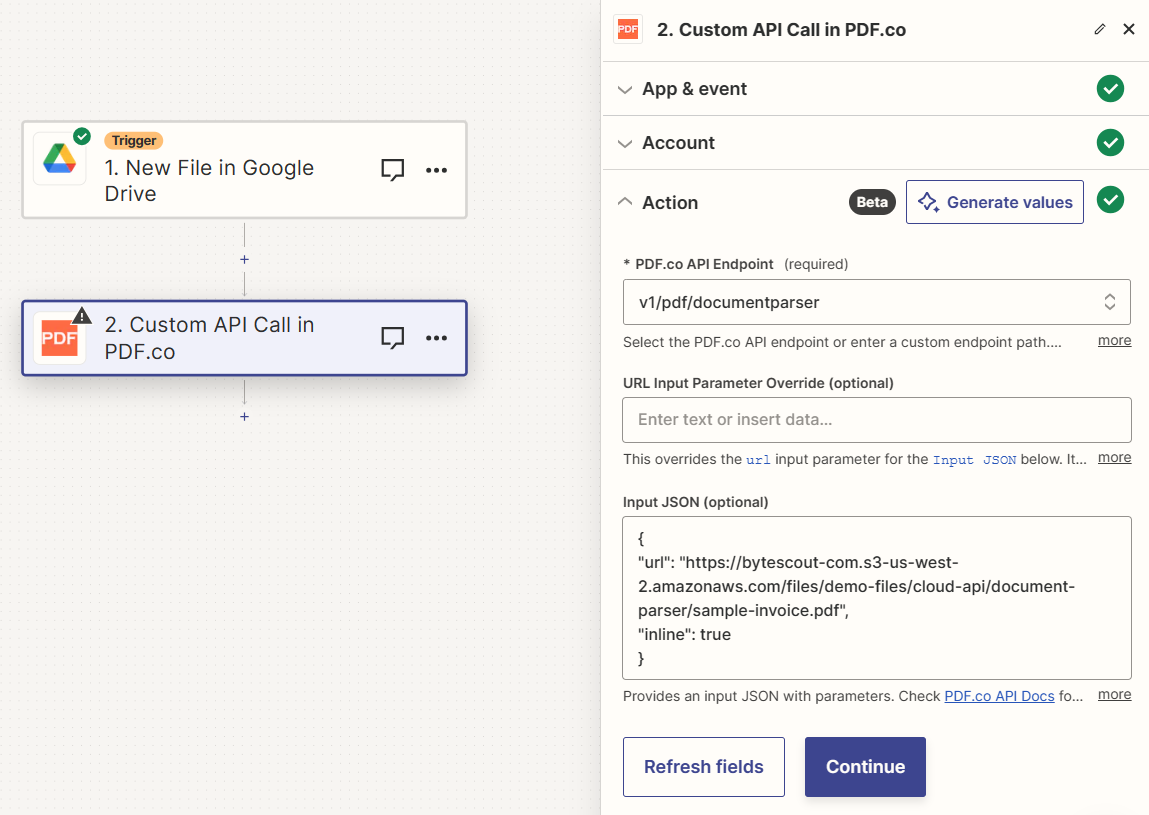
Input
Source PDF URL & Google
When using Google Drive, it’s typically recommended to choose the File option. For more advanced file integration techniques, see Integrating File Sources with pdf.co.

Documentation Index
Fetch the complete documentation index at: /llms.txt
Use this file to discover all available pages before exploring further.
Integrate this step into your Zapier workflow to execute custom API calls to the PDF.co API, designed for advanced users who need more flexibility and control.

| Name | Description | Required |
|---|---|---|
| PDF.co API Endpoint | Choose a PDF.co API endpoint or input a custom endpoint path. Consult the PDF.co API Docs for detailed information. | Yes |
| URL Input Parameter Override | Override the url input parameter in the Input JSON. Accepts direct links, filetoken:// links (for files in PDF.co Built-In Files Storage), or multiple comma-separated links. Compatible with Google Docs, Google Drive, Dropbox links that are accessible without login. | No |
| Input JSON | Provide an input JSON containing the necessary parameters for the API call. | No |

| Name | Description |
|---|---|
url | The temporary URL on the PDF.co file server. |
outputLinkValidTill | A timestamp which indicates how long the url will be available for. |
error | Details of any errors (if any). |
status | The response status code. If all good this will be 200. |
jobId | The unique identifier for the job. |
credits | The credits spent on the process. |
remainingCredits | The credits left on your account. |
duration | The time it took for the process. |
Was this page helpful?