

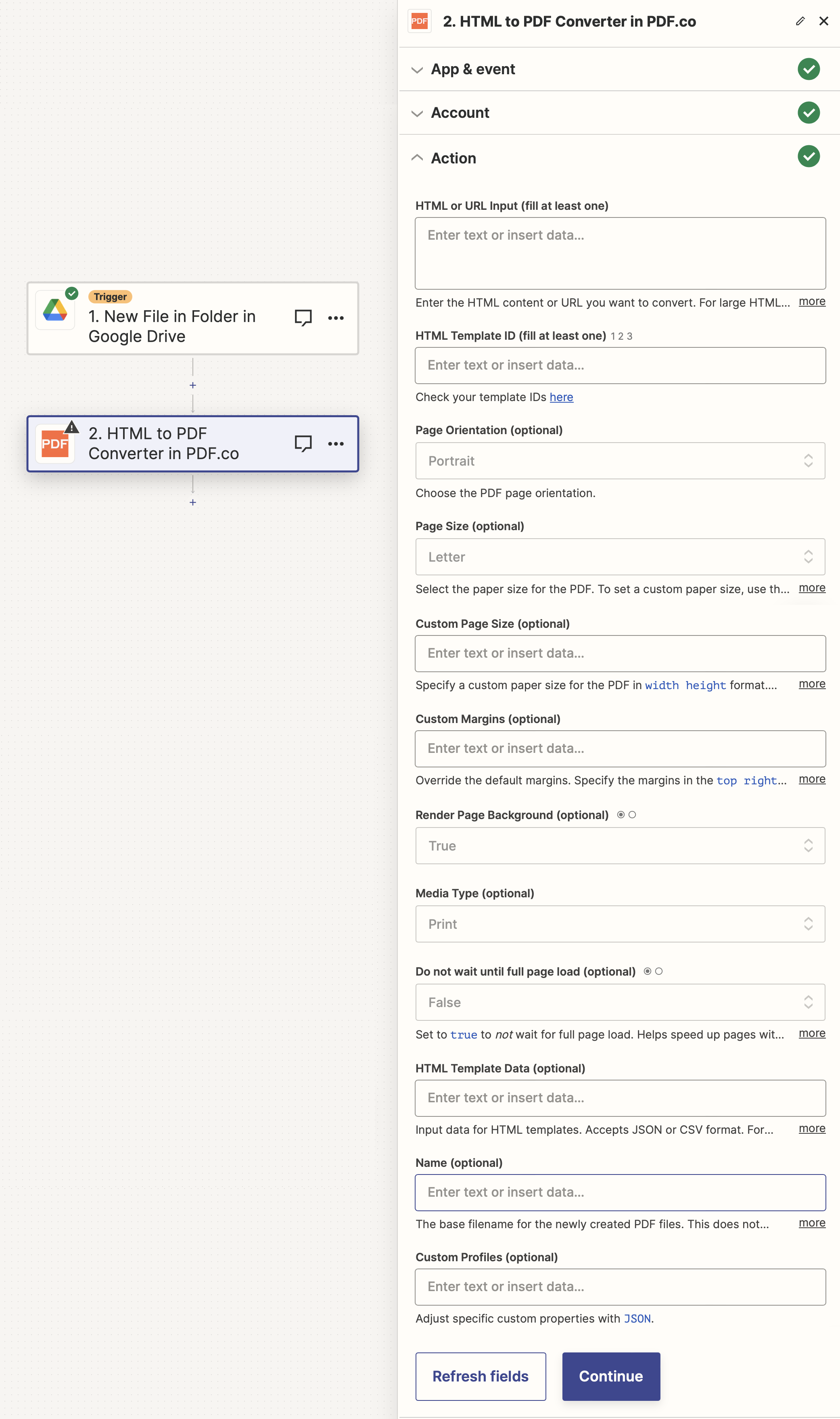
Input
The Zapier action doesn’t expose every PDF.co API parameter as a field. To pass a parameter that isn’t shown, put it under This works for any standard parameter listed in the API Reference. See Standard Parameters for details.
std_params in the Custom Profiles field (see Custom Profiles below). For example, to add a repeating header and footer to every page:{ "std_params": { "header": "<div>My Header</div>", "footer": "<div>My Footer</div>" } }
| Name | Description | Required |
|---|---|---|
| HTML or URL Input | Enter the HTML content or URL which you want to convert. | Yes (unless HTML Template ID is used) |
| HTML Template ID | Select a Template ID from your HTML to PDF Templates | Yes (unless HTML or URL Input is used) |
| Page Orientation | Choose the PDF page orientation. | No |
| Page Size | Select the paper size for the PDF. | No |
| Custom Page Size | Use this instead of Page Size to specify a custom paper size for the PDF in width height format. You can use px, mm, cm or in units. For example: 200px 300px, 200mm 300mm, 20cm 30cm, or 6in 8in. | No |
| Custom Margins | Override the default margins. Specify the margins in the top right bottom left order. You can use px, mm, cm or in units. You can set margins for all sides at once using a single value, for example: 10px. | No |
| Render Page Background | Whether to render the page background from the HTML source or not. | No |
| Media Type | Select Print or Screen quality for the PDF output | No |
| Do not wait until full page load | Set to true to not wait for full page load. Helps speed up pages with dynamic content. | No |
| HTML Template Data | Input data for HTML templates. Accepts JSON or CSV format. For example, for JSON: '{ "total": "500" }', or for CSV: 'column1,column2,column3 value1,value2,value3'. If your template ID has variables this is how you can input data your into the PDF. | No |
| Name | The output file name. If left blank then htmltopdf.pdf will be used. | No |
| Custom Profiles | A JSON string which adds options for the conversion process. See Custom Profiles for more. | No |
Output
| Name | Description |
|---|---|
url | The temporary URL on the PDF.co file server. |
outputLinkValidTill | A timestamp which indicates how long the url will be available for. |
error | Details of any errors (if any). |
status | The response status code. If all good this will be 200. |
name | The name of the file. |
jobId | The unique identifier for the job. |
credits | The credits spent on the process. |
remainingCredits | The credits left on your account. |
duration | The time it took for the process. |
Custom profiles
Use Custom Profiles to enhance your workflow with additional processing options. EnterJSON configuration to customize OCR settings, output format, text extraction methods, and more.

Sample JSON
{ "ImageOptimizationFormat": "JPEG", "JPEGQuality": 25, "ResampleImages": true, "ResamplingResolution": 120, "GrayscaleImages": true }
You can use any regular API parameter from the API Reference within Zapier using the
std_params feature in profiles. The std_params enables the definition of regular API parameters in a JSON format, See Standard Parameters for detailed documentation and examples.| Parameter | Type | Default | Description |
|---|---|---|---|
outputDataFormat | string | - | If you require your output as base64 format, set this to base64 |
HTMLCodeHeadInject | string | - | Injects CSS into the HTML <head> section to prevent page breaks within specified elements. See HTML to PDF Knowledge Base for more information. |
DataEncryptionAlgorithm | string | - | Controls the encryption algorithm used for data encryption. See User-Controlled Encryption for more information. The available algorithms are: AES128, AES192, AES256. |
DataEncryptionKey | string | - | Controls the encryption key used for data encryption. See User-Controlled Encryption for more information. |
DataEncryptionIV | string | - | Controls the encryption IV used for data encryption. See User-Controlled Encryption for more information. |
DataDecryptionAlgorithm | string | - | Controls the decryption algorithm used for data decryption. See User-Controlled Encryption for more information. The available algorithms are: AES128, AES192, AES256. |
DataDecryptionKey | string | - | Controls the decryption key used for data decryption. See User-Controlled Encryption for more information. |
DataDecryptionIV | string | - | Controls the decryption IV used for data decryption. See User-Controlled Encryption for more information. |